
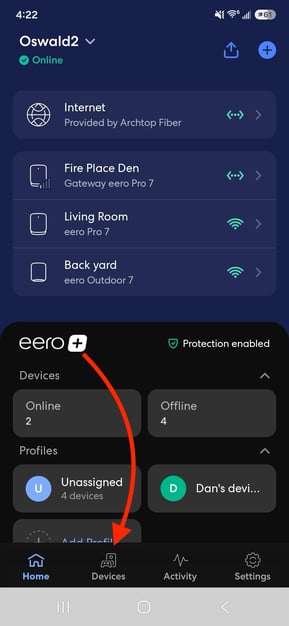
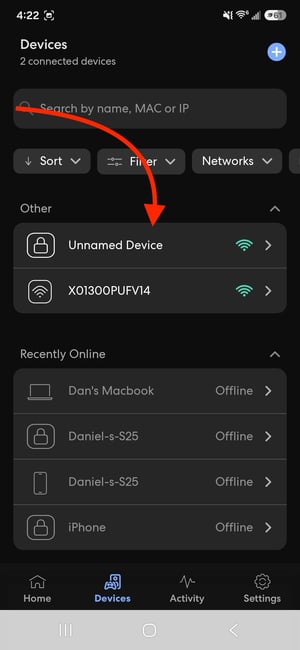
To assign or edit a device's nickname:
- Locate the device on the Home tab under Devices, or search for it in the Devices tab
- Tap the device’s current nickname
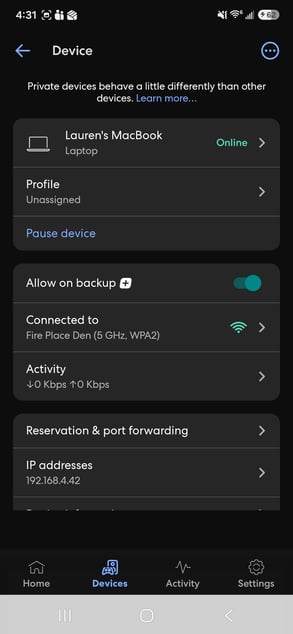
- On the Device page, tap the device’s current nickname again to open the Appearance page
- Edit the nickname and/or change the symbol that identifies the device’s type.Tap Save in the upper-right corner when you’re finished.
- Tap Save in the upper-right corner when you’re finished
.jpeg?width=304&height=659&name=Media%20(13).jpeg)
.jpeg?width=295&height=640&name=Media%20(14).jpeg)
Why doesn't my device manufacturer look familiar?
The manufacturer shown in the eero app is often the company that made the device's Wi-Fi or Ethernet chipset, not the brand of the device itself. For example, a Samsung TV or Dell laptop may appear under the name of its network hardware manufacturer. This is normal and expected behavior.
Why does one device appear in my device list more than once?
Some devices have multiple network adapters, such as separate Wi-Fi and Ethernet connections. If a device has connected to your network using both methods, it may appear more than once in the eero app. To avoid confusion, we recommend assigning a nickname to each instance of the device.