
The eero app automatically runs a speed test every one to three days. To initiate a manual speed test, follow these steps:
- Open the eero app. If you do not yet have the app installed, please refer to this article for installation instructions.
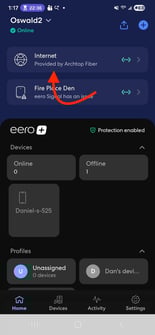
- Tap Internet on the Home tab.
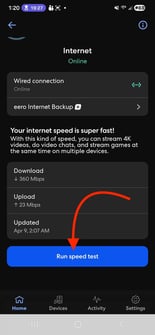
- Scroll down and tap the Run speed test button.
- Based on your internet connection, your download and upload speed test results will appear in about a minute.
Why are the eero app speed results different from the ones on my device? The eero app speed test measures the connection speed from Archtop Fiber to the eero gateway, not the speeds between your router and your devices. As a result, the eero app speed will not change as you move around your home.
It is completely normal for eero speed test results to differ from speed tests run on your device. Below are some common reasons for this, along with a few recommended speed test tools you can use.
-
Your device may be built to handle lower speeds than What Archtop Fiber offers
-
Distance between your device and the closest eero
-
Placement of your eeros
-
Nearby sources of interference like other wifi devices and reflective surfaces
- Speed test tools: Ookla or Fast.com